About program
Network Macmonitor WMI Provider is a dynamic library that allows you to get information about which users are active on computers using WMI protocol. Also, when you install the program, the computer is assigned a unique WMI ID.
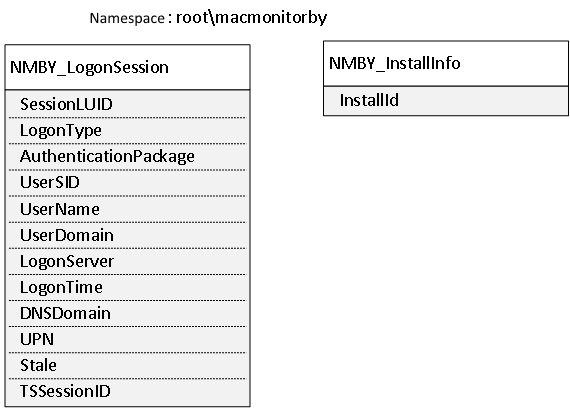
During installation the program creates root\macmonitoby namespace in the WMI repository and two classes in it: NMBY_InstallInfo – to identify the computer and NMBY_LogonSession – to identify the active users of the computer.
Port usage
| Local | Remote | Direction | Protocol | Type | Extra information |
135
49152-65535
|
- | inbound | WMI | TCP | Windows Vista and newer, Windows Server 2008 and newer |
135
1025-5000
|
- | inbound | WMI | TCP | Windows XP, Windows Server 2003 |
Install program
The program is installed by running the installer file macmonprov_ latest.exe.
The installer file macmonprov_latest.exe supports command line parameters.
- /SILENT
- If specified, the installer will not ask the user to confirm the installation. The installation progress will be displayed on the screen.
- /VERYSILENT
- Same as /SILENT + nothing on the screen.
- /LOG
- Creates a program installation log file in the user’s temporary directory (% TEMP%).
- /LOG=”file name”
- Same as /LOG, with explicit log file name.
- /NORESTART
- The installer does not restart the computer, even if necessary.
Uninstall program
The program can be removed from the “Pontrol Panel” → “Programs and Features” or by running the uninstaller file unins000.exe, which is located in the directory where the program installed.
The uninstaller file unins000.exe supports command line parameters.
- /SILENT
- If specified, the uninstaller will not ask the user to confirm the deletion and will not display a message indicating that the deletion is complete. Any critical error messages will be displayed on the screen.
- /VERYSILENT
- Same as /SILENT + nothing on the screen.
- /LOG
- Creates a program uninstall log file in the user’s temporary directory (% TEMP%).
- /LOG=”file name”
- Same as /LOG, with explicit log file name.
- /NORESTART
- The uninstaller does not restart the computer, even if necessary.