Install license activation file
Generate license request file. To do this, go to the menu item Settings-> License-> Generate license request, fill in the fields and click the generate button.
- Organization
The name of your organization;
Corporate e-mail of the contact person of your organization;
- Number of monitored ports/connected ports/number of monitored computers
Desired number of monitored ports/connected ports/ Desired number of monitored computers;
- Allowed ip addresses
Non-editable field, ip addresses of the network interfaces of the computer where Network MACMonitor is installed. The allowed number of ipv4 addresses is 1, the allowed number of ipv6 addresses is 2. If there are more addresses, you must correctly configure the network interfaces of the computer where the program is installed so that the limits are not exceeded, and only then generate a license request file.

Send the license request file to the email address info@macmonitor.by, in the email write the website of your organization.
Receive the license activation file to the email specified in the license request.
Install the license activation file. To do this, go to the menu item Settings-> License-> Install License.

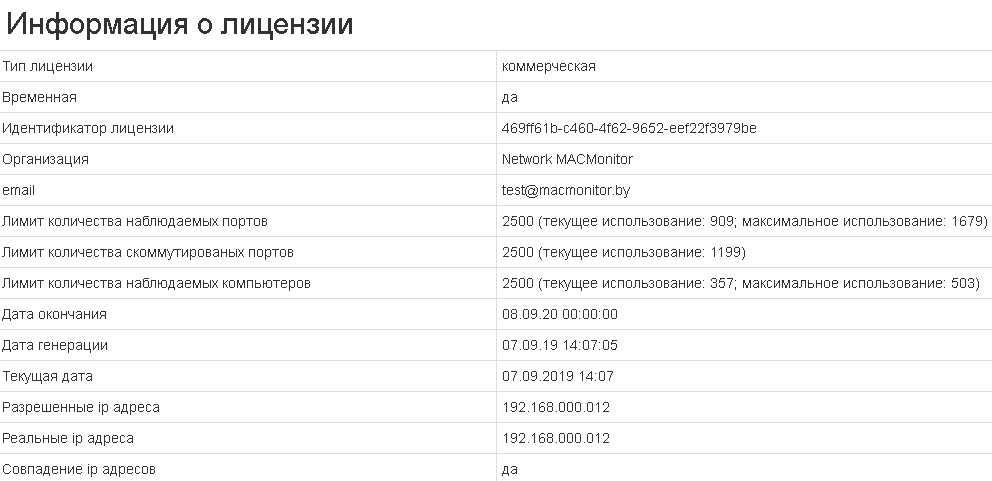
You can view the status of a license by going to the menu item Settings-> License.
- License type
Free, trial, commercial.
- Temporary
Yes - the license is limited in time, no - the license is not limited in time.
- License identifier
The unique identifier of the trial or commercial license.
- Organization
The name of the organization that has been given a trial or commercial license.
The corporate e-mail address of the contact person of the organization that has been given a trial or commercial license.
- Maximum number of monitored ports
The maximum simultaneous number of ports on which mac addresses are monitored.
- Maximum number of connected ports
Максимальное количество портов сетевых устройств, к которым подключен коммутационный кабель.
- Maximum number of monitored computers
The maximum simultaneous number of computers monitored via WMI protocol.
- Expiration date
The expiration date of the temporary license.
- Generation date
The date when the license activation file was generated.
- Current date
Current date.
- Allowed ip addresses
IP addresses that a computer with a program allowed to have on its network interface (for trial and commercial licenses).
- Real ip addresses
IP addresses that the computer has with the program on its network interface (for trial and commercial licenses).
- Ip addresses match
Check that real ip addresses include allowed ip addresses (for trial and commercial licenses). If the value is not, then the number of monitored ports will be limited to ten and the number of monitored computers will be limited to ten.