Reports
В отчетах можно просмотреть данные собранные программой во время опроса устройств c помощью SNMP, WMI, LDAP, DNS.
The “Reports” menu item contains 4 submenus:
- Network;
- Computers;
- Users;
- User sessions.

Submenu “Network”
This report contains information about the location of the endpoints on the ports of the network devices. Data is stored without limit in time. The report is generated according to the “Reports update period” option in the global settings. You can manually initiate a report update by clicking the Update button. You can also edit endpoints in this report and assign groups to them. A report search is available.
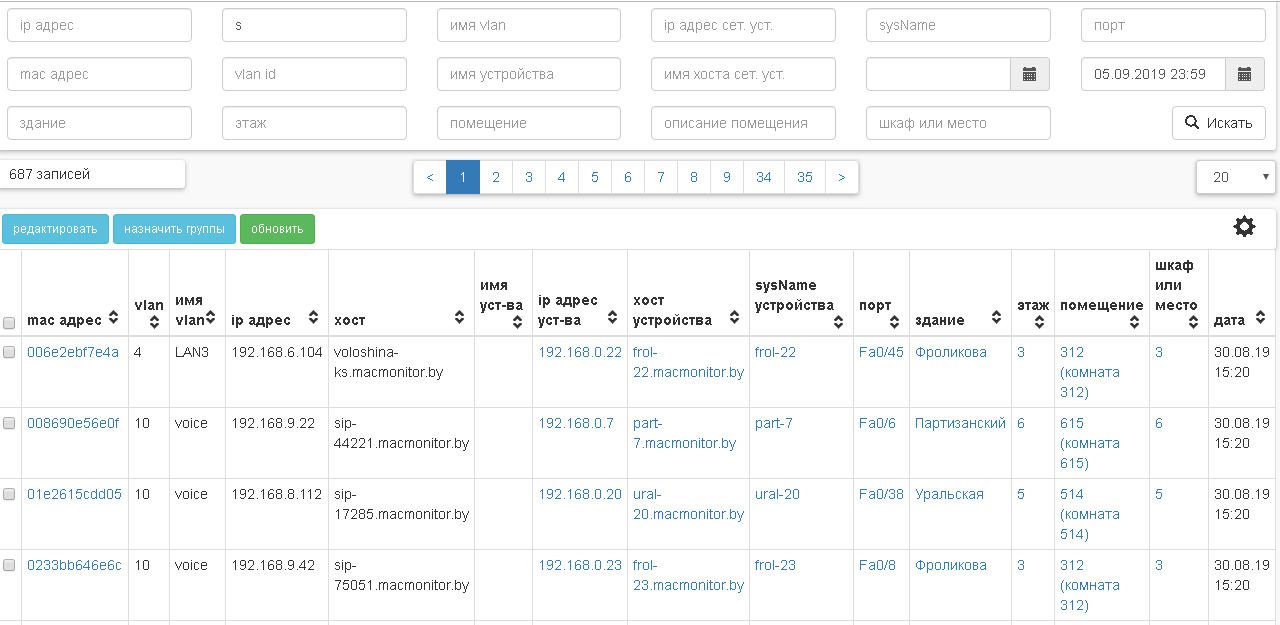
Table columns (You can select columns by clicking the gear icon):
- mac address;
- vlan;
- vlan name;
- ip address;
- hostname;
- имя уст-ва;
- device ip address;
- device hostname;
- device sysName;
- port;
- здание;
- этаж;
- помещение;
- шкаф или место;
- date.
Note
Note that IP addresses are mapped to MAC addresses using ARP and neighbor tables of network device .
By clicking on the port you can view detailed information about it.


By clicking on the MAC address you can view detailed information about the endpoint with this MAC address.


Submenu “Computers”
The Computers menu item contains information about computers with Windows operating system. The report is generated according to the “Reports update period” option in the global settings, if the “Wmi poll enabled” option is enabled.
Info tab
The tab contains information about computers. There is a possibility of search in this report. You can also delete computers.

Table columns:
- computer name;
- domain;
- dns name;
- operating system;
- architecture;
- version;
- build number;
- last seen – the time when the computer was last seen;
- last boot time;
- mac addresses;
- ip addresses.
By clicking on the computer name you can view detailed information about it.

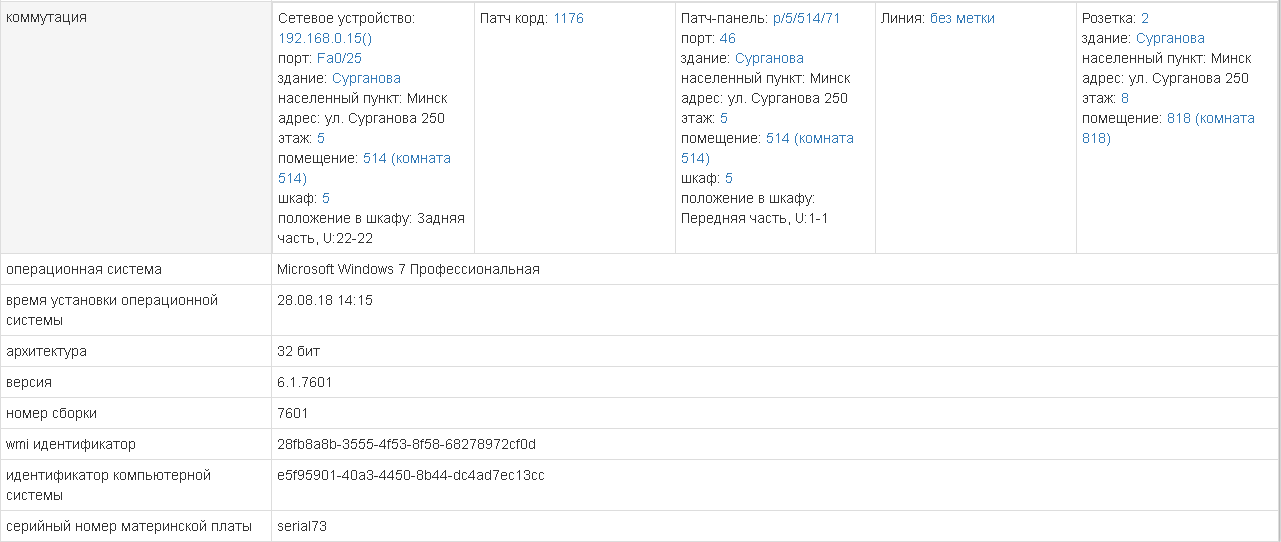
Note
You should pay attention to the WMI identifier parameter. The WMI identifier uniquely identifies the computer if Network MACMonitor WMI Provider is installed on the computer. If Network MACMonitor WMI Provider is not installed, the identification will be performed on three parameters: computer system product identifier, base board serial number, operating system installation date.
Delete computers: You can select multiple computers at once and delete them. When you delete a computer, all user sessions associated with it will be deleted.

Logs tab
The Logs tab contains information about events related to computers. There is a possibility to search in logs.
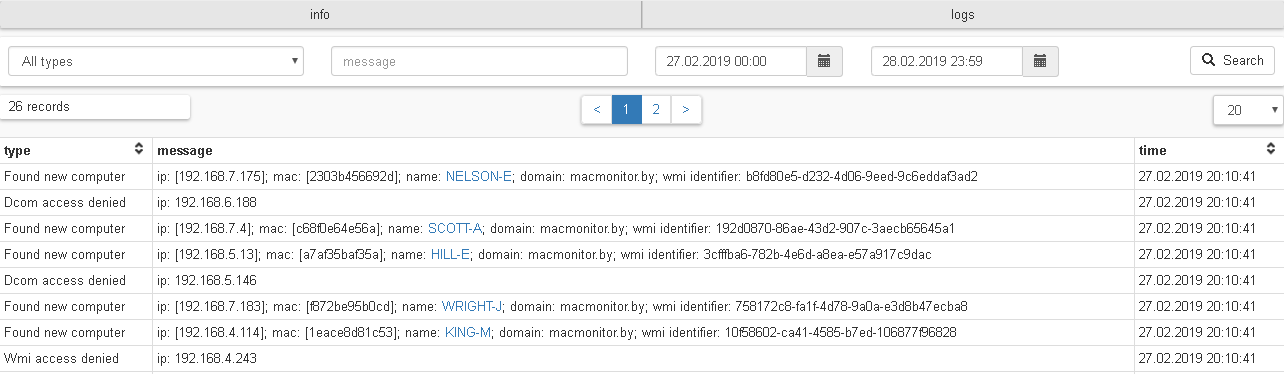
Table columns:
- type;
- message;
- time.
Record types:
- Dcom access denied
- You must allow Dcom access to the account that is used to poll the computer.
- Wmi access denied
- You must allow Wmi access to the account that is used to poll the computer.
- Wmi identifier duplication
- You must reinstall Network MACMonitor WMI Provider on the computer.
- Computer renamed
- The computer has been renamed.
- Found new computer
- New computer was found.
- No wmi idebtifier
- You must install Network MACMonitor WMI Provider on the computer.
- Change ip address
- Ip address of the computer has been changed.
- Change mac address
- Mac address of the computer has been changed.
Submenu «Users»
The submenu contains information about users of computers. The report is generated according to the “Reports update period” option in the global settings if the “Wmi poll enabled” option is enabled. User information will be collected from computers that have Network MACMonitor WMI Provider installed. It is also possible to enable the option “Enable LDAP active directory users synchronization during wmi poll” and then users and their attributes will be synchronized with the Active Directory LDAP. The following attributes will be collected from the LDAP AD: userPricipalName, objectSid, SamAccountName, cn, distinguishedName. You can also select two custom attributes in the LDAP AD settings: the full user name (the default is displayName), the phone (the default is telephoneNumber). You can delete users from the report.
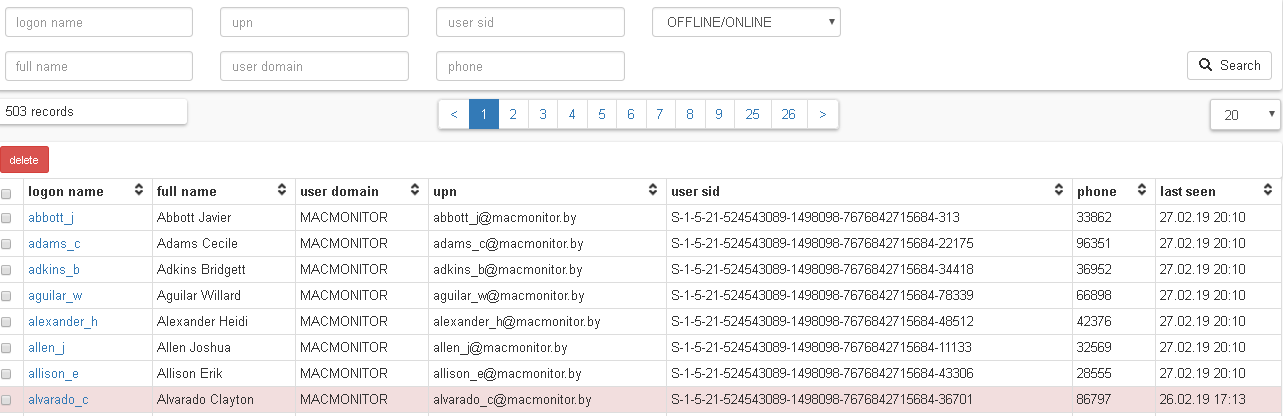
Table columns:
- logon name;
- full name;
- user domain;
- upn;
- user sid;
- phone;
- last seen – the time when the user was last seen.
Clicking on the user login you can view detailed information about it, as well as the history of its sessions on computers.

Delete users: you can select multiple users and delete them. Deleting a user will delete all its user sessions. It will also delete information about it in computer report, port and endpoint information.

Submenu “User sessions”
This submenu contains information about user sessions on computers. The report is generated according to the “Reports update period” option in the global settings, if the “Wmi poll enabled” option is enabled. You can search in this report.
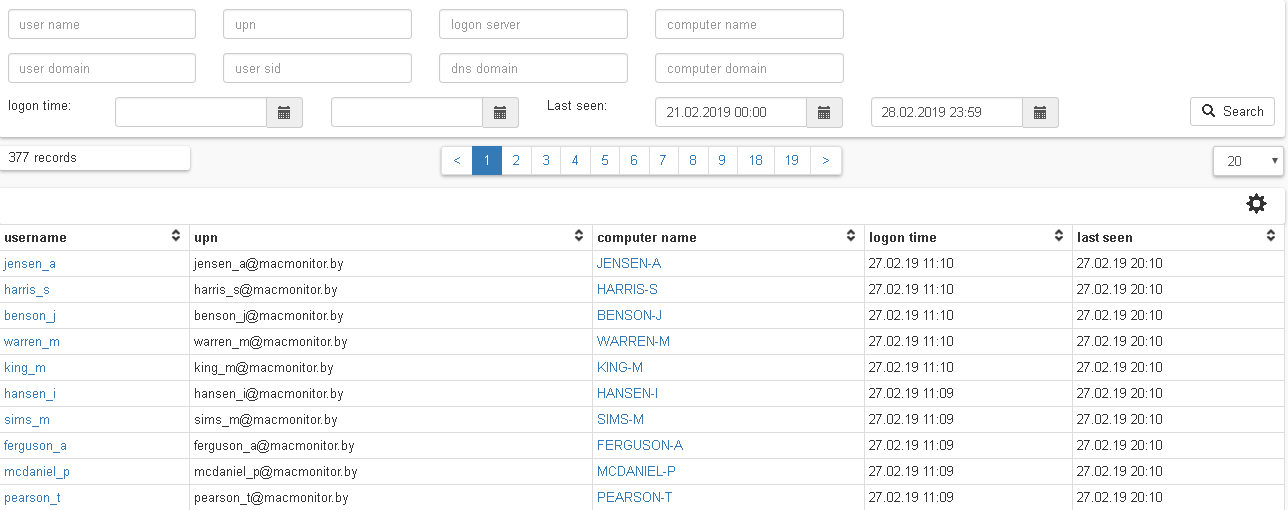
Table columns:
- username;
- user domain;
- upn;
- user sid;
- logon server;
- dns domain;
- computer name;
- comp domain;
- logon time;
- last seen – the recent time when the session was active.