Места
The Places menu item contains 5 subparagraphs:
- Здания;
- Этажи;
- Помещения;
- Шкафы;
- Места.

Подпункт меню «Здания»
The menu sub contains information about buildings. Buildings can be added, edited, and deleted. You can add floors to buildings.

Описание столбцов таблицы:
- название;
- населенный пункт;
- адрес;
- ответственный;
- телефон;
- описание;
- сетевые устройства все/офлайн.
When you add a building, you must specify:
- Название;
- Населенный пункт (опционально);
- Адрес (опционально);
- Ответственный (опционально);
- Телефон (опционально);
- Описание (опционально).

Редактирование здания аналогично его добавлению.

Removing buildings: You can select several buildings at once and remove them. At the same time, if there are floors associated with these buildings, the buildings will not be removed.

Информация о здании
Clicking on the building, you can go to the page with details about this building.
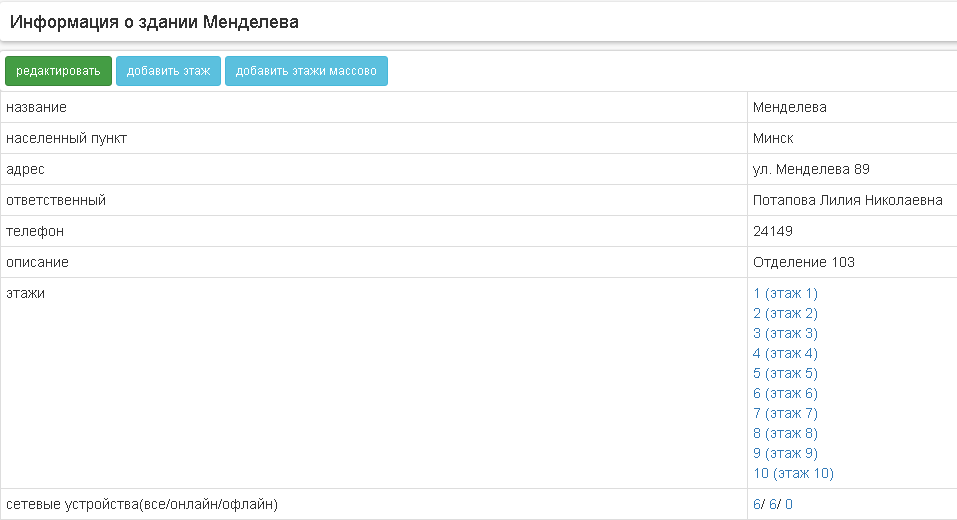
On the page there is an opportunity to add a floor to the building.

Так же можно добавить этажи массово.

Подпункт меню «Этаж軶
Подпункт меню содержит информацию об этажах в зданиях. Этажи можно добавлять, редактировать и удалять. На этажи можно добавлять помещения.

Описание столбцов таблицы:
- этаж;
- описание;
- здание.
При добавлении этажа необходимо указать:
- Здание;
- Номер этажа;
- Описание (опционально).

Редактирование этажа аналогично его добавлению.

Removal of floors: you can select several floors at once and remove them. At the same time, if there are premises associated with these floors, the floors will not be removed.

Информация об этаже
Clicking on the floor, you can go to the page with details about this floor.
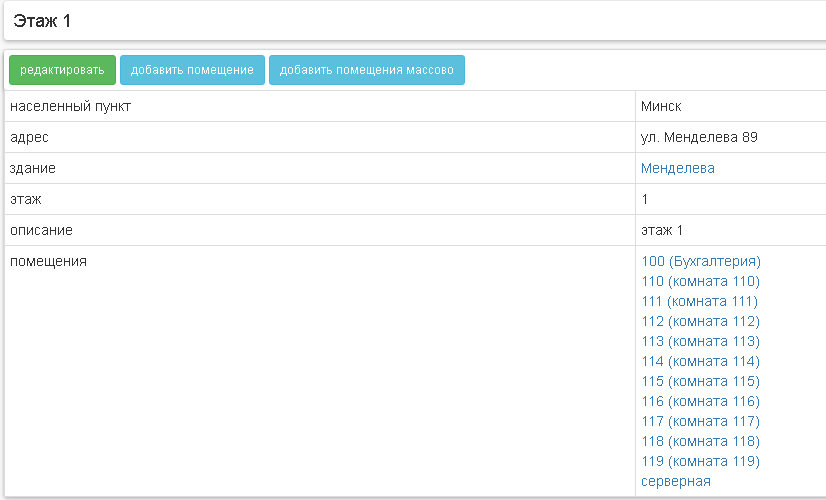
On the page there is an opportunity to add space to the floor.

You can also add space en masse.

Подпункт меню «Помещения»
The menu sub contains information about the rooms on the floors. Rooms can be added, edited, and removed. You can add cabinets, seats and sockets to your rooms.

Описание столбцов таблицы:
- помещение;
- описание;
- этаж;
- здание.
When you add a room, you must specify:
- Здание;
- Этаж;
- Название;
- Описание (опционально).

Editing a room is similar to adding it.

Removal of premises: you can select several rooms at once and remove them. At the same time, if there are cabinets, places or sockets associated with these premises, the premises will not be removed.

Информация о помещении
Clicking on the room, you can go to the page with detailed information about this room.
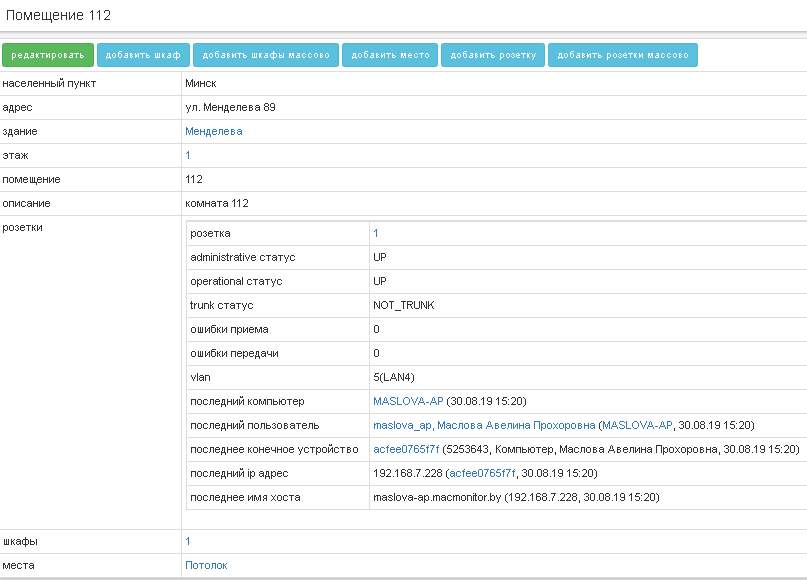
On the page there is an opportunity to add a closet, a place, a network outlet to the room.


There is also the greatness of the mass addition of cabinets and sockets.


Wardrobes menu sub
The menu sub contains information about switching cabinets indoors. Cabinets can be added, edited, and deleted. You can place network devices and patch panels in your closets.

Описание столбцов таблицы:
- шкаф;
- высота - высота шкафа в юнитах;
- описание;
- помещение;
- этаж;
- здание.
When you add a closet, you must specify:
- Здание;
- Этаж;
- Помещение;
- Идентификатор;
- Высота в юнитах;
- Описание (опционально).

Редактирование шкафа аналогично его добавлению.

Removal of cabinets: you can select several cabinets at once and remove them. At the same time, if there are network devices or patch panels associated with these cabinets, the cabinets will not be removed.

Информация о шкафе
Clicking on the floor, you can go to the page with details about this floor.


On the page, you can add patch panels to the closet.

Подпункт меню «Мест໶
The menu sub contains information about places in the premises. In places, you can place seit devices that are not placed in cabinets.

Описание столбцов таблицы:
- место;
- описание;
- помещение;
- этаж;
- здание.
When you add space, you should specify:
- Здание;
- Этаж;
- Помещение;
- Идентификатор;
- Описание (опционально).

Editing a place is similar to adding it.

Removal: You can select multiple seats at once and remove them. At the same time, if there are network devices associated with these places, the seats will not be removed.

